Release
2019.09.001
Angekündigt am
Diese Release-Notizen liegen im englischen Original vor.

SpiceCRM 2019.09.001
Reporting Module
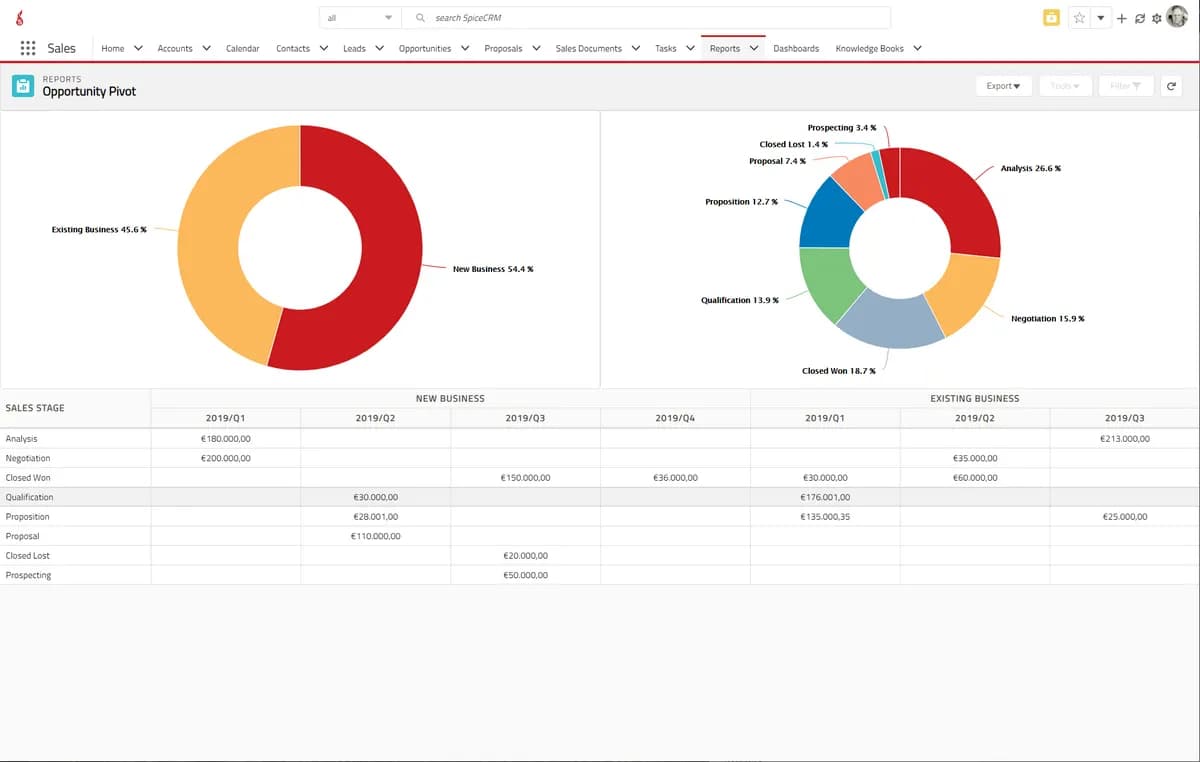
Highlights of the Fall Release are updates on the Reporting Module. We ported the views for the Pivot Table, the grouped and grouped with summary view and also the TreeView to the SpiceUI. This is an ongoing effort where we are bringing the best in class reporting functionality to the lightning experience with SpiceCRM. As we believe that integrated analytics is a key necessity this is an important step on our roadmap.
We continued to develop additional functionality for Marketing adding a basic event management. This allows planning and tracking of events. Add partners that play specific roles in the event. Track invitations and registration. Add a self service registration to your website.
Close&New Button
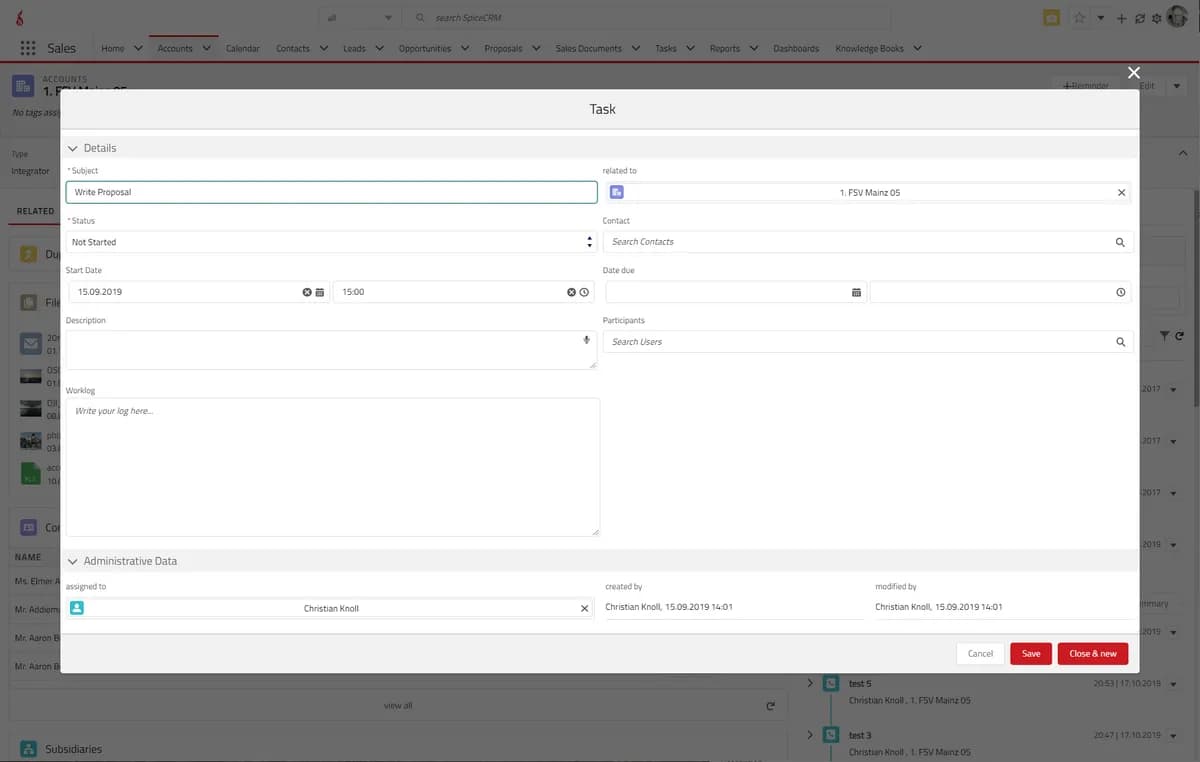
Also the good old “close&new” button in activities made it back to the new UI. For some time we did think there would be a life without it. We accept we have been wrong. So back it is. Allowing an easy way to close one activity and add a new one. But it would not be SpiceCRM if we did not make it better. So we added flexibility to customize it and to also let the user choose which activity to add next. Allowing an easy closing of for example a call and scheduling a meeting.
Besides that, there are further features worth mentioning like an easy way to change the users time zone, enhancements in the Calendar and also with the FTS engine. We also added a bulk indexer that will allow fast indexing with the elastic search. And many more…
The Release in Details
Ability for admins to view/change foreign user preferences
Ability for admins to view/change foreign user preferences
Actionset menus refactored
Object list header action menu and object action menu should extend the object action container
Adapting Date Time Fields
Date time fields constantly adapt to the current time zone setting of the user.
Add Componentset to spicebeanguidestages
Added a componentset as configuration option to the spicebeanguides. This allows to render a componentset instead of the description in the beanguide with the path. e.g. fields relevant for the sales stage can be rendered there or other components that might deliver valuable information
Add sort parameters to the dashlet generic component
Add sort parameters to the dashlet generic component
Added adminonly flag to tabcontainer item components
Added a config option “adminonly” to the tab container items (regular and vertical). If you set the tab it will only be rendered if the user is an admin user. Mainly used for the user tabs to only show some tabs to the admin but not to the regular user.
Added new Reporter Views
Added Reporter Views for Summary, Grouped, Tree and Pivot View
All Character Analyzers in FTS
Added two new analyzers spice_standard_all and spice_ngram_all that can be set and will include all characters (including, whitespace, punctuation and symbols) in the tokens and the search. This makes sense for e.g. name fields where a company name or a release name or version name includes those characters and they should not be stripped when tokenizing and searching using elastic search.
Ask for important user preferences at startup
Ask for important user preferences at startup
Auto correct the sort query for the many to many relation table
When we pass a none-db sort field for a module which is a mapped field in the many to many table, the sort query will be auto adjusted.
Avoid duplicate user names
Avoid duplicate user names
Backend only for admins
Backend only for admins
Better determination of user roles (for app launcher dialog)
Better determination of user roles (for app launcher dialog)
Better role assignment
With an icon custom roles now are recognizable as custom roles. The same name for a global and for a custom role is no longer a problem. Furthermore: Alphabetically ordered list.
Bug fix : retrieve with sort failed in one to many bean relationship
Bug fix : retrieve with sort failed in one to many bean relationship
Button “Save HTML content” in “Rich Text Editor ” Toolbar
Save button in the Toolbar of “Rich Text Editor” Component, which pass the content to “Field Rich Text” component to handle the save process.
Close activity button
- Button for activities (only unclosed and editable)
- Opens modal with componentset (enter closing data)
- Create new bean with copyrules (new add-modal for selected module)
CloseModal and ActionMenu merge
Implementing the closemodal with the new actionsetmenu
Colorenum color in read-mode
No color in read-mode by the fieldcolorenum field
CloseModal and ActionMenu merge
CloseModal and ActionMenu merge
default-sort ObjectList
ObjectList with default sort info (moduleconf)
Dashboardsets
Define a set of Dashboards to be displayed in sub tabs in home.
Event Management
This Module will be responsible for the Event Management. An event will be defined with some basic info like it’s url or it’s capacities and so on. It will also have a relation to some other modules like accounts and contacts as participants or organizers and so on. It will also be possible to have some assigned activities.
Field Grouped Enum
A Field which displays checkboxes grouped under specific categories
Field Multiple Enum Dropdown
The field multienumdropdown renders an enum field as a dropdown multiple select list using the SystemMultipleSelect component.
French language package
French language package
FTS Manager: add button index bulk
Trigger bulk indexing manually
Improved Scheduler Job Log
Improved Scheduler Job Log
Incorrect checkbox value interpretation
The checkbox values in the Administration Configurator components were being interpreted incorrectly. The values stored in the DB as both 0 and 1 were interpreted as true (checkbox checked). The only value interpreted as false was NULL. The correct interpretation was already implemented before. However, the value was converted only for “boolean” types whereas the field type used was “bool”. This was corrected in the bug fix
KnowledgeBase – Button Release All
“Button Release All” set the status to “Release” to the selected document and all its sub documents
KReporter: update where operators
Enable where operator for int when vardef type is bigint
Lightning Design update to 2.10.0
Lightning Design update to 2.10.0
Load date time user preferences on user login
Load default values when preference is not set
Output Templates II
The document (result of a output template) is now savable in the CRM system.
Reload button for the sub panel header
Sub panel: When no item is shown/available the footer – including the reload button – is hidden. Now also the header has an include button.
SalesDocs additional fields: incoterms, payer, invoice recipient
SalesDocs additional fields: incoterms, payer, invoice recipient
Scheduler field: Last SUCCESSFUL run
Scheduler field: Last SUCCESSFUL run
Scheduler: Test function (dummy)
Scheduler: Test function (dummy)
Select Custom Actionset in config option
It should be possible to select custom actionsets in the workbenchconfigoptionactionset!
System Multiple Enum Dropdown
A Field which renders a list of items grouped under specific categories in a dropdown with multiple selection functionality.
System Statistics
Added a component in the admin section to gather storage statistics on the database, elastic and the file system for uploads for the system.
Time Zone Field for the Global User Panel
Time Zone Field for the Global User Panel
Update Global Module Menus
Changed the handling of the module Menus of the global navigation items so menu now considered an action set and allows adding custom actions
Url rewrite for IIS: web.config files for config and proxy
Url rewrite for IIS: web.config files for config and proxy
UTC Offset added to UI Date Field Values
UTC Offset has been added to the UI Date Field Values to display the right date for the current UI Time Zone
Week Number for the System Date Picker
Added a Week Number in the System Date Picker
Where Clause on relationship_role_column not implemented
Fixed M2MRelationship::getRoleFilterForJoin() and make use of it
Fragen zu dieser Version? Schreiben Sie uns.