Release
2019.04.001

SpiceCRM 2019.04.001
Tagging
Highlights of the April Release are updates on tagging. We made it significant easier to simply tag records. In the same style as in regular Web Applications just add Tags. As you type SpiceCRM will suggest existing tags. Choose them and reuse existing tags or simply create new ones.
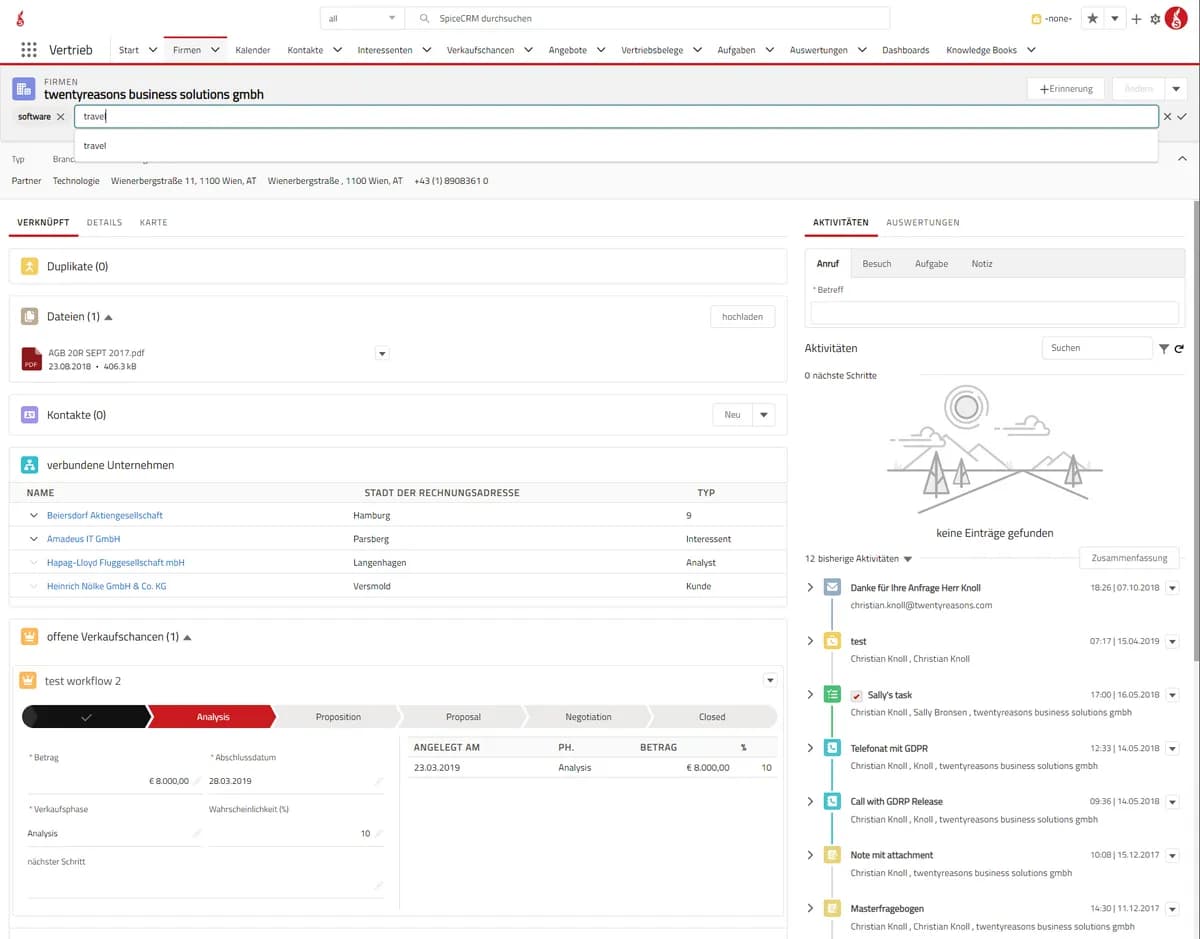
Tags are also included in the Full Text search and can easily be selected as aggregates. With the next releases we will also add them to the target lists so you can build flexible lists simply be assigning tags to targetlists and all records tagged with that term will automatically be used when the targetlist is used.
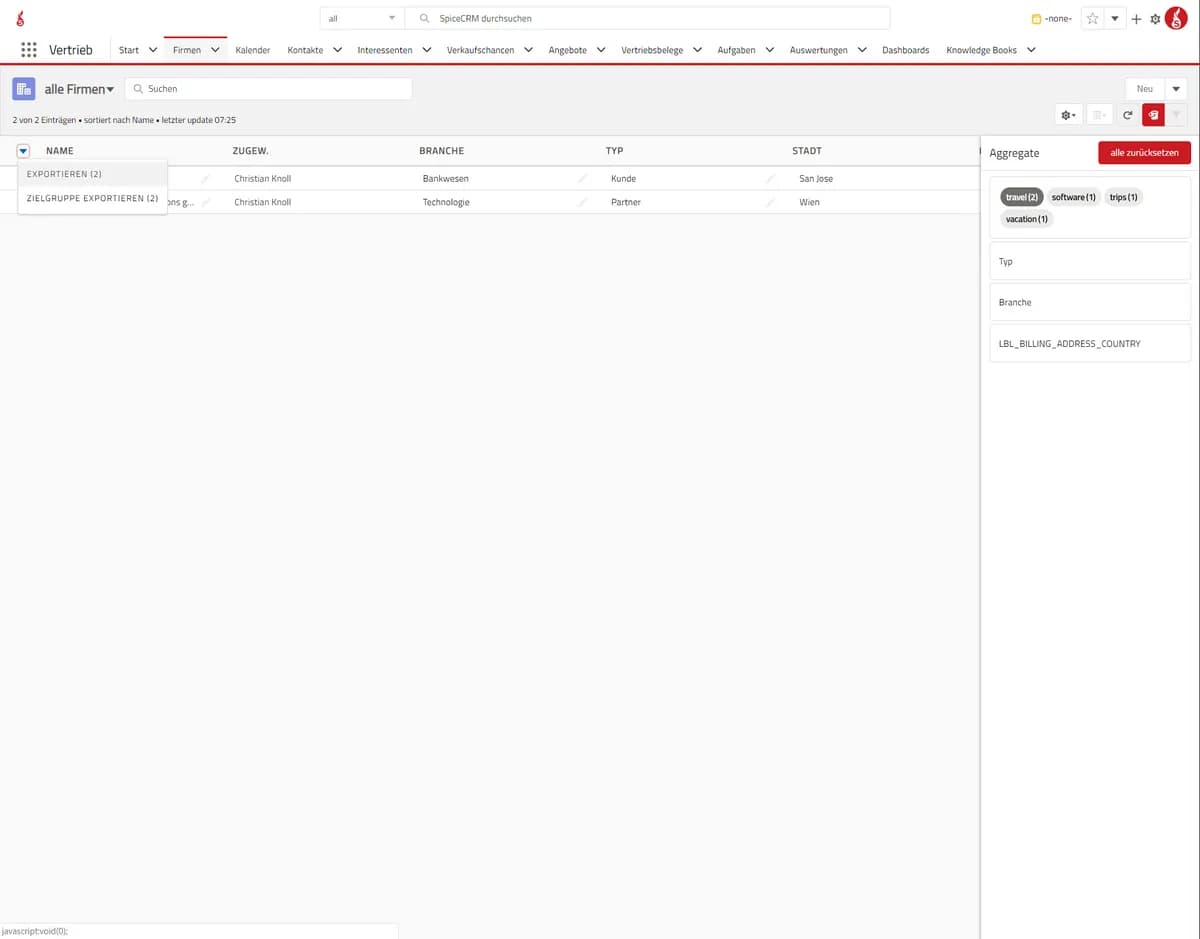
Also exporting as been made much easier, so you can just select the records based on the tags and then simply export them to a CSV or a target list directly from the list view.
Asides that there have been quite some changes on the backend. A lot in preparation for the upcoming updated on ACL as well as the work in progress on our vardef/metadata manager.
The Release in Details
Backend: Merge Record configure records limit
Configure maximal count of selected records to be merged at the same time. Set config variable in config.php or config_override.php: Example: $sugar_config[‘default_max_mergeable_records’] = 2;
Backend: Schedulers – make use of Vardefmanager for Schedulers module
Code clean up: use vardefmanager to create Scheduler vardefs so that date_indexed field (for FTS capability) is created during SpiceCRM installation.
Backend: SpiceTheme: – support custom images for module icons
Added capability to retrieve images from custom path for module icons in side bar display
Backend: Subpanels – enable search within Subpanel and set max count of records to be displayed
- New class include/SubPanel/SubPanelSearch.php under namespace SpiceCRMincludesSubPanel; Parameter ‚”tr_config” in former developments refactored to “search_config” $sugar_config variable containing dropdown values for max count of records: $sugar_config[twentyreasons][tr_subpanellimits] renamed to $sugar_config[subpanelsearch][limit_dd_values]
- Example: $sugar_config[‘subpanelsearch’][‘limit_dd_values’] = array(‘5’ => ‘5’, ’10’ => ’10’, ’50’ => ’50’);
Backend: Subpanels – property value dependency for subpanel display
Make subpanel display dependent of a property set in focus bean. Set name of property in attribute “trdisplay_for” (array) in Layoutdefs setup of Subpanel. Subpanel wil be displayed if focus->$propery is true.
Backend: Fix Load Hooks from Database
Do not load Hooks from database when no global database instance is available. Also fixed hook_array structure for hooks retrieved from database.
Bug fix : Field Email validation
Field Email Validation on save action was always returning an error message “input required” even though the field was filled.
Catch and handle bean action state for UI
Store which action is being applied to bean: create, update
Field Relate List
For a predefined module Relation this field can retrieve a list of a related module and it’s possible to set a limit for the listed items.
Field Text ID
This field translates a ” text id” into a human readable value.
FTS: fix DB Query error during install process
Fix DB Query error during install process
File Download in Firefox
In some cases the download of generated files (CSV, PDF) or attachments did not work properly. This has been fixed and now it should also work as expected in Firefox. Tested successfully with Firefox 65.0.2 and 66.0.2.
Fix KReporter search and sort in bucket manager
Fix KReporter search and sort in bucket manager
KReporter capability with SpiceACL
New Access Management module SpiceACL shall be considered in KReporter-Queries.
Language Translation Manager
This component provides a platform to easily handle the untranslated labels for the default language.
Login name for UserAccessLogs
Added the field “login_name” to UserAccessLogs to store the login names of failed login attempts
Memorize search terms and Results in ListView
Keep the searchterm. selected aggregates and results in the listview when navigating away from a list and back.
Missing confirmation queries
Added confirmation queries for the deletion of attachments or the deletion of items in related lists.
Object Texts
This component handles the related texts of a module.
PDF Preview in print Output
PDF preview has been added to the output templates. So in the window where the user can choose an output template the user can also choose to display the rendered output as PDF or as HTML. PDF is preset. This renders the PDF in the PDF Reader embedded and shows right away the generated result. The PDF can then also be downloaded but is seen as it will be rendered on the screen.
Related Panel animations
Added animations to the related panels so when they collapse and expand are smoothly faded in and out with height and opacity
Sequenced ObjectRelatedListList (Drag & Drop)
Added the ability to order the items of a related list by drag & drop. Until now this was possible in subpanels, now it is also possible for the full list (“list all”).
Show link name as title of related lists
Added the ability to entitle subpanels or full related lists with specific title of the relation (instead of the title of the module).
Spicecrm_fe_factory: improve gulp jobs for deployment
- Add delete dist folder in js:build job
- Add check on file.ts exists when uglifying the .js counterpart. Throw error when not found
- Set current year over a variable in comments instead of hard coded
SystemInputNumber
This component use “two way binding” to handel a number value and reformats it to fit the system formatting and it also accepts the following parameters (precision, min, max).
Added animation to collapsible panel
Added animation to the collapsible card in the systems so it animates smoothly when collapsed or expanded
Added configuration option to global search result
Added an option to set fieldsets for the global search results (GlobalHeaderSearchResultsItem) so the fields displayed in the search box can be flexible defined.
Added elastic normalizers
- Added the support to define own normalizers.
- The standard ones are defined include/SpiceFTSManager/normalizers/spice_normalizers.php and can be overwritten in the custom directory, adding your own ones.
- Default is a lowercase normalizer that is applied to raw fields for sorting- so sorting is not case sensitive
Added language filter support to FTS Indexer
- In the fts connection settings a new option has been added- to add a language specific filter by default to the spicecrm standard analyzers and normalizers.
- To better understand the language analyzers and their impact, check out https://www.elastic.co/guide/en/elasticsearch/reference/6.7/analysis-lang- analyzer.html.
- A setting can e.,g. be german_normalization that then analyzes and normalizes specific to German language. If none is set, no specific language filter is applied
Added query types for duplicate check
- Added the option for different query Types in the duplicate check
- Match (or): matches any of the terms in the field. Also supports fuzziness
- Match (and): matches all terms in the field. Also supports fuzziness
- Term: requires an exact match, no fuzziness supported
Added sort field in FTS
In the metadata the sor_on property can be defined for a field. Added the support that this is also enabled and considered in the FTS search. This allows e.g. that in a list of contacts the full_name field can be displayed but the the list is sorted by the last_name of the contact.
update Loader Logic
Changes to the loader logic and cleanup of REST services
update Tags
Update on Tagging and Tag handling
CRM Log Viewer: Negative filtering
Added the ability to filter out log entries with specific text fragments.
Select field for modal input prompt
Select field for modal input prompt.
Questions about this version? Write to us.